


Why You Shouldn’t Need a Database Engineer to Add a Field
TL;DR: Traditional software locks you into pre-defined fields or charges you thousands for “custom field” configuration. Data Fields give you 20+ field types and calculated formulas—no database design degree required.
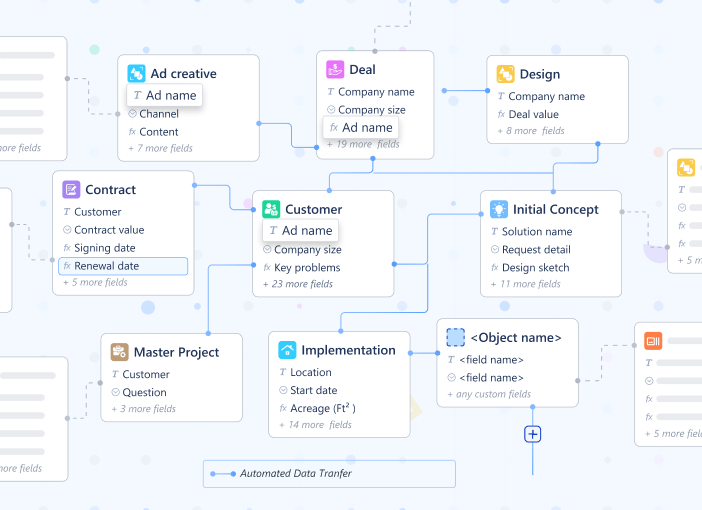
Your VP of Sales walks into your office with a simple request: “Can we track which marketing campaign each deal came from?”
With traditional CRM software, this triggers a process:
- Submit a feature request to IT
- Wait for the next sprint planning
- Pay for custom field configuration ($500-2,000 depending on vendor)
- Wait 2-4 weeks for implementation
- Train everyone on the new field
Your team needs to track campaign attribution today. The deal cycle doesn’t wait for your software vendor’s roadmap.
The Fixed Schema Problem
Most business software ships with fixed data structures. The “Customer” record has these fields. The “Project” record has those fields. If you need something different, you’re out of luck—or you’re paying for customization.
The hidden costs:
- Workarounds. Teams repurpose existing fields. “Description” becomes a dumping ground for three different types of information. Good luck running reports on that.
- Spreadsheet exports. When the tool can’t capture the data structure you need, people export to Excel and manage it there. Now you have two sources of truth.
- Vendor lock-in. Custom field configuration means vendor dependency. Want to switch platforms? Good luck migrating your custom schema.
- IT bottlenecks. Every new data requirement becomes a ticket. IT becomes the gatekeeper to basic operational flexibility.
20+ Field Types, Zero Database Design
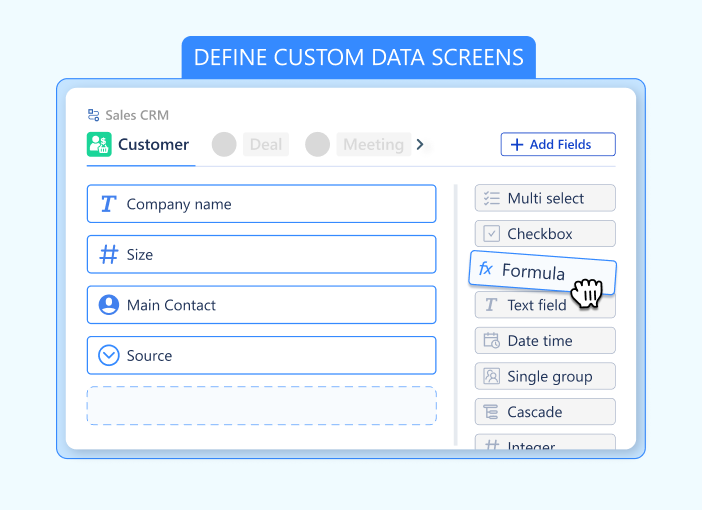
Data Fields in Luklak flip this entirely. Every Universal Object you create comes with unlimited custom fields—and you add them yourself, instantly.
Available field types:
Basic data capture:
- Text (Single line or Paragraph)
- Number (Integer, Decimal, Percent)
- Currency (Multi-currency support)
- Date & Date Time
- Checkbox (True/False)
- Email, Phone, & URL (with validation)
Selection and categorization:
- Single Select (Dropdown)
- Multi Select (Tags)
- Rating (1-5 stars or custom)
Structure & Logic:
- Object Picker (The universal connector)
- Formula (Calculation engine)
- Table (Mini-database inside a field)
- User Picker (Assignees)
No database schema to design. No migration scripts to write. Just point, click, and define the field.
Formulas Without Code
Here’s where it gets interesting. Not only can you capture any data structure—you can calculate values automatically using formula fields.
LAIKA’s deal scoring example:
They needed to prioritize deals based on multiple factors: deal size, industry fit, urgency, and relationship strength. Traditional CRM would require:
- External scoring tool ($200/month)
- Integration to push scores back
- Manual updates when criteria change
With Data Fields, they built it directly:
Deal_Score =
  (Deal_Amount / 10000) * 0.4 +
  Industry_Fit_Score * 0.3 +
  Urgency_Score * 0.2 +
  Relationship_Strength * 0.1
The formula field calculates automatically. Change the deal amount? Score updates instantly. Adjust the weighting? Edit the formula once—every deal recalculates.
More formula examples:
Project profitability: Revenue - (Hours_Logged * Hourly_Rate + Material_Costs)
Days until deadline: DAYS_BETWEEN(TODAY(), Due_Date)
Completion percentage: (Completed_Tasks / Total_Tasks) * 100
Conditional status: IF(Days_Overdue > 7, "Urgent", IF(Days_Overdue > 0, "Late", "On Track"))
No separate BI tool needed. No nightly ETL jobs. Just formulas that calculate in real-time as underlying data changes.
Structured Data Within Data
Some information doesn’t fit into simple fields. You need nested structure.
Example: A construction project needs to track multiple cost estimates from different vendors.
The traditional workaround: Create a separate “Estimate” object, link it to the project, manage the relationship manually.
With Data Tables: Add a “Vendor Estimates” field directly on the project object. The field contains a table structure:
| Vendor Name | Quoted Price | Delivery Time | Notes |
|---|---|---|---|
| Vendor A | $45,000 | 6 weeks | … |
| Vendor B | $42,500 | 8 weeks | … |
| Vendor C | $48,000 | 5 weeks | … |
The data lives on the project object. No separate relationship to manage. The table is queryable, sortable, and visible right where you need it.
Other data table use cases:
- Line items on invoices
- Task checklists within projects
- Contact history on customer records
- Certification records on employee profiles
- Inspection findings on equipment assets
Object Picker & Dot Notation: The Universal Data Tube
In traditional tools, connecting data is messy. You create a “Link” field, then a separate “Lookup” field to see details, then a “Rollup” to sum numbers. It’s cluttered and rigid.
Luklak eliminates this with the Object Picker.
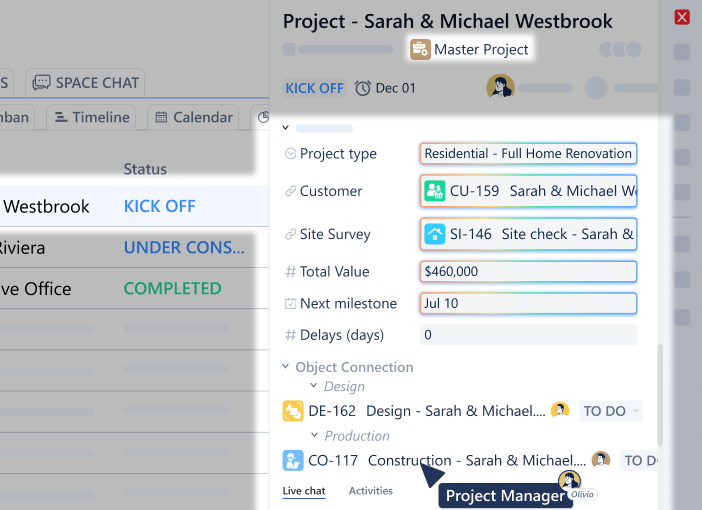
Think of the Object Picker as a “data tube” that connects two objects. Once connected, data flows freely in all directions. You don’t need extra fields to see that data; you simply “reach through the tube” using Dot Notation.
Here are 3 real-world examples of how this replaces complex coding:
1. The Org Tree: Dynamic Approval Routing
You can build a complete hierarchy of your company using Object Pickers: Employee picks Team, Team picks Department.
When an employee submits a “Budget Request,” the automation doesn’t need to ask “Who is the manager?” You simply configure the workflow to assign the approval task to:
Request.Creator.Team.Manager
Why it matters: You don’t hard-code names. If you change the manager of the “Marketing Team” object, every future request routes to the new person automatically.
2. The Attribution Counter: ROI Tracking
You want to know how many customers came from a specific “Facebook Ad.” Instead of building complex reports, you just look at the Ad Object. Because the customers picked that Ad, the connection is already there.
You simply add a formula field on the Ad:
Ad.Customers.Count
Why it matters: As soon as a new customer signs up and references the Ad, the counter on the Ad object increments automatically (+1). You see your ROI in real-time without running a report.
3. The Context Link: Instant Data Inheritance
A Support Ticket is created for a specific Project. The support agent needs to email the client, but the client’s email is on the Client Object, not the ticket.
Instead of copying and pasting, you just use the connection path:
Ticket.Project.Client.Email
Why it matters: The email address lives in one place (the Client record). But it is accessible everywhere (Tickets, Projects, Invoices) instantly through the dot notation.
The Schema Evolution You Actually Need
Business requirements change. Your data model needs to evolve with them.
LAIKA’s evolution:
- Week 1: Basic customer tracking. Fields: Name, Email, Phone, Company Size.
- Week 3: Added industry classification and lead source tracking. Two new fields. Took 3 minutes.
- Week 6: Introduced deal scoring. Added formula field. Took 5 minutes.
- Week 9: Started tracking project profitability. Added rollup fields to sum costs. Took 10 minutes.
- Week 12: Needed vendor comparison tables on projects. Added data table field. Took 15 minutes.
Zero IT involvement. Zero vendor fees. Zero downtime. The schema evolved as their business evolved.
Why This Matters for Operations
- Capture exactly what you need. No forcing your data into someone else’s predetermined fields. No repurposing “Description” to hold six different pieces of information.
- Calculate automatically. Profit margins, completion rates, days-until-deadline, weighted scores—any calculation you can define in a formula becomes a live field.
- Query across everything. Because all fields exist in the Universal Object architecture, you can query them together. Show all customers where Industry = “Construction” AND Total_Project_Value > $100,000 AND Days_Since_Last_Contact > 30.
- No export-to-Excel ritual. The data structure you need lives in the system. The calculations happen automatically. The reports run natively.
Field-Level Intelligence
Data Fields aren’t just storage—they’re smart.
- Validation rules: Ensure email fields contain valid emails. Prevent negative numbers in quantity fields. Require specific formats for SKU codes.
- Default values: New projects automatically inherit customer’s preferred currency. New tasks get assigned to project owner by default.
- Required fields: Mark critical fields as required. Users can’t save the object until those fields are completed.
The Flexibility Tax You’re Not Paying
Traditional enterprise software charges you for flexibility:
- Custom fields: $500-2,000 per field
- Formula fields: Often unavailable or require professional services
- Data tables: Rare, expensive, or non-existent
- Schema changes: Require vendor support, downtime, migration fees
With Data Fields: Add unlimited fields. Write formulas. Create data tables. Change your schema. All included. No fees. No waiting.
The flexibility tax disappears when your platform is built for customization from the ground up.
What This Means for Your Team
- For operators: Stop forcing work into predetermined boxes. Capture information the way your process actually works.
- For analysts: Stop exporting to Excel for calculations. Build formulas directly on your objects. Reports update automatically.
- For managers: Stop waiting on IT for simple schema changes. Add fields when you need them. Evolve your data model as your business evolves.
When you can capture any data structure and calculate any formula—without database engineers or vendor fees—your operational data actually reflects how work happens. Not how someone else thinks it should be structured.
That’s why Data Fields matter. They let your information model evolve at the speed of your business.
Next in the series: Object Connections — How to relate anything to anything without foreign keys or join tables.