


Context Blindness: Stop Asking your Best People to Make Decisions in the Dark
TL;DR: Your business doesn’t operate in isolated lists—it operates in a web of relationships. Yet your software treats a “Client,” a “Project,” and a “Contract” as strangers. Discover how the Object Picker turns your disconnected data into a living business graph.
It is 4:00 PM on a Friday. A support ticket lands in the queue: “The server is down.”
Your senior engineer, Sarah, is a professional. She sees the ticket. She sees the asset ID (SRV-884). She fixes the crash in 12 minutes. She closes the ticket, satisfied with a job well done.
On Monday morning, you receive a cancellation notice.
Why? Because SRV-884 wasn’t just a server. It belonged to Orion Logistics. And Orion Logistics was in the middle of a delicate contract renewal. And the Account Manager had specifically flagged that client as “High Risk.”
Sarah didn’t fail at engineering. She failed at context.
She fixed the server because that’s what the ticket told her to do. But she didn’t call the Account Manager because the ticket didn’t “know” about the renewal.
This is the penalty of Siloed Architecture. Your “Tickets” list doesn’t talk to your “Sales” list. Your “Assets” list is a stranger to your “Contracts” list. Your team is forced to make decisions looking through a keyhole, seeing only the immediate task but missing the business reality.
The End of the “Flat List”
Most business software is essentially a collection of fancy, disconnected spreadsheets.
- The CRM knows who the customer is.
- The Project Tool knows what work is being done.
- The Finance System knows who hasn’t paid.
But in the real world, these things are inseparable. A “late payment” (Finance) impacts the “project timeline” (Operations), which changes the “renewal strategy” (Sales).
When your software keeps these objects separate, you create Context Blindness. You force your employees to be human bridges, manually checking three different systems to stitch together a picture that should be obvious.
The Business Graph: Wiring the Neural Network
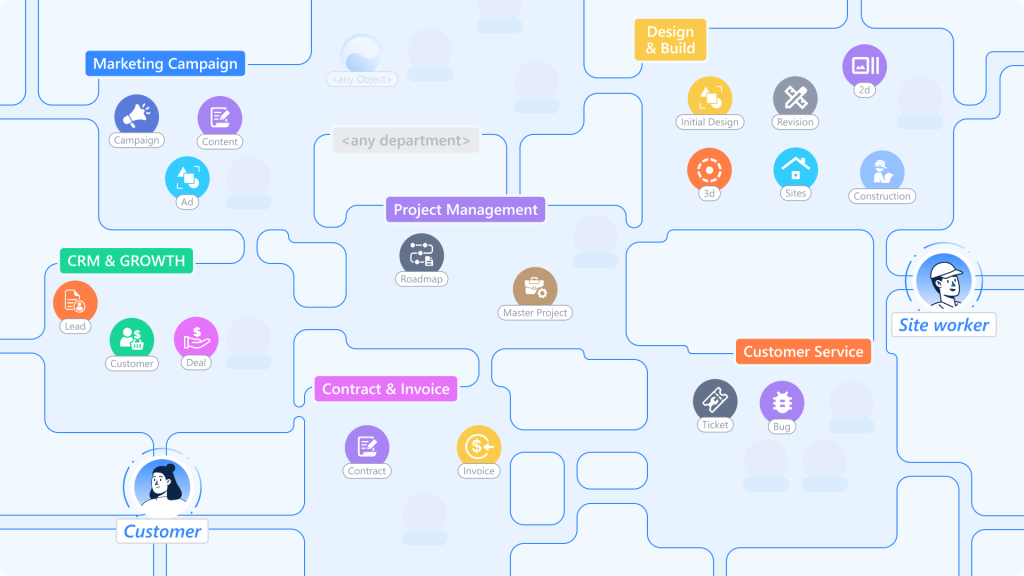
To build a System of Intelligence, you need more than just “links.” You need to model the physics of your business. Luklak provides four distinct ways to wire your Business Graph.
1. The Object Picker: The “Neural Spine” (Dependency)
- The Logic: “I belong to that.” (N-to-1)
- The Use Case: Strong, directional ownership.
This is the “Data Tube” we discussed previously. It is the strongest bond in the system. When you use the Object Picker, you are declaring that Object A is dependent on Object B.
Example: A Support Ticket picks a Client. The Ticket cannot exist in a vacuum; it belongs to the Client. Because of this strong bond, the Ticket automatically inherits the Client’s context (SLA tier, Account Manager, Renewal Date).
- When to use it: When you need to “reach through” to pull data (Dot Notation) or route approvals based on ownership.
2. The Object Link: The “Network” (Association)
- The Logic: “We are related, but I don’t own you.”
- The Use Case: Mapping the messy, many-to-many reality of business.
Unlike the Object Picker (which says “This Ticket belongs to that Client”), the Object Link creates a web. It answers the question: “What else is this related to?”
Here are 3 common scenarios where you need Links, not Pickers:
Scenario A: The “Talent Pool” (Recruiting)
The Problem: A candidate, John Doe, applies for the “Senior Designer” role. Two weeks later, he applies for the “Art Director” role.
The Intelligence: When you look at John’s profile, you see his entire history with your company—every role he’s applied for, linked in a timeline.
If you used an Object Picker, you’d have to choose: Does John belong to the Designer role or the Director role? He can’t belong to both.
The Object Link Solution: You create a Candidate object for John. You Link him to both Job Openings.
3. The Data Table: The “Container” (Embedding)
- The Logic: “I am a detail inside you.”
- The Use Case: Structured transactional data (Orders, Logs, Fees).
Traditional databases force you to make a messy choice. If you want to add “Line Items” to an Order, you usually have to create a completely separate object type called “Order Items.” Suddenly, your system is flooded with millions of tiny records that clutter your global search.
The Data Table field solves this by embedding a mini-database directly inside the parent object. It allows you to mix static data, object connections, and calculations in a single grid.
Here are the 3 most common patterns:
Pattern A: The “Shopping Cart” (Inventory & Calculation)
The Scenario: You are creating a Sales Order. You need to list 5 different products, their quantities, and calculate the total.
The Intelligence: You aren’t just typing text. By picking the Product object in Column 1, the table automatically pulls the current price from the Inventory system to do the math in Column 3. If the Inventory price changes later, you can choose to freeze this price or update it.
The Table Structure:
Column 1 (Object Picker): Pick Product from Inventory. (e.g., “MacBook Pro”)
Column 2 (Number): Quantity. (e.g., “5”)
Column 3 (Formula): Quantity * Product.UnitPrice
Pattern B: The “Fee Schedule” (Variable Costs)
The Scenario: A Real Estate Contract has various closing costs that differ for every deal.
The Intelligence: You can add as many rows as needed. A “Total” field at the bottom sums up the column automatically and feeds into the Contract’s “Total Deal Value” field.
The Table Structure:
Row 1: “Legal Fee” – $500
Row 2: “Inspection” – $250
Row 3: “Transfer Tax” – $1,200
Pattern C: The “Maintenance Log” (History)
Scenario: You are tracking a Company Vehicle. You don’t need a separate “Ticket” for every oil change; you just want a running history on the Vehicle record.
- The Table Structure:
- Date: 12/01/2025
- Service: “Tire Rotation”
- Cost: $80
- Technician (User Picker): @Mike
- The Intelligence: This keeps the data local. When you look at the Vehicle, the history is right there. You don’t have to search for “Tire Rotation” in a global task list.
Why this matters: Data Tables keep your architecture clean. Global objects (like Projects and Clients) live in the main graph. Transactional details (like Line Items and Logs) live safely tucked inside them.
4. Parent-Child: The “Breakdown” (Strict Hierarchy)
- The Logic: “I am a sub-unit of you.” (1-to-N)
- The Use Case: Execution and progress tracking.
Infinite nesting is a trap—it is where work goes to die. Luklak enforces a strict 2-Level Structure: Parent and Child.
This is designed for execution. You have a Project (Parent) and Tasks (Children). You have a Goal (Parent) and Key Results (Children).
The Intelligence: Because this relationship is strictly defined, the status rolls up automatically.
If 5 out of 10 Tasks are “Done,” the Project automatically shows 50% progress.
If a Task (Child) is “Blocked,” the Project (Parent) automatically flags as “At Risk.”
3 Scenarios: When the Bigger Picture Changes Everything
When you stop managing “rows” and start orchestrating a “graph,” blind spots disappear.
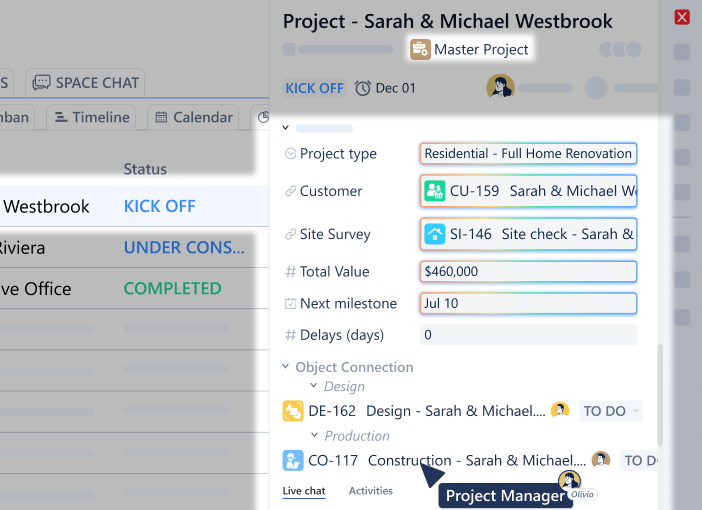
1. The “Renewal” Defense (The Sarah Scenario)
The Siloed Way: Sarah sees a broken server. She fixes it. The client churns.
The Connected Way:
- The Connection:
Ticket→Server→Client→Renewal Status - The Logic: The system sees the ticket is for a client in “Contract Negotiation.”
- The Outcome: Before Sarah even opens the ticket, the system automatically flags it as URGENT and auto-CCs the Account Director.
- Sarah doesn’t just fix the server; she sends a personal note to the client, reassuring them during the negotiation. The renewal is saved.
2. The “Ghost” Budget
The Siloed Way: A Marketing Manager requests $10,000 for a new campaign. The Finance Director approves it because the “Marketing Budget” spreadsheet says they have funds.
The Connected Way:
- The Connection:
Budget Request→Campaign→Vendor Contracts - The Logic: The system checks the real commitments. It sees that while the cash hasn’t left the bank, there are 3 pending contracts connected to this campaign that haven’t been invoiced yet.
- The Outcome: The system warns the Finance Director: “Approving this will cause an overspend of $4,000 based on pending contracts.” The blind spot is revealed before the money is spent.
3. The “Scope Creep” Trap (The Laika Scenario)
The Siloed Way: A client emails the Project Manager at a design agency: “Can we just make these 3 small changes to the layout?” The PM, wanting to be helpful, says “Sure” and assigns the task to a designer.
The Connected Way:
- The Connection:
Task→Project→Contract→Scope Definition - The Logic: The designer goes to start the task. The system checks the Contract linked to the Project. It sees that “Layout Revisions” are capped at 2 rounds, and this client has already used both.
- The Outcome: The system automatically flags the task: “Billable Change Order Required.”
- Instead of doing free work that eats into margins, the PM sends a quote for the additional scope. The client pays. The agency remains profitable.
The Power of “Dot Notation” (Reaching Through the Graph)
You don’t need to be a coder to traverse this graph. You just need to know how to “reach” through the connections.
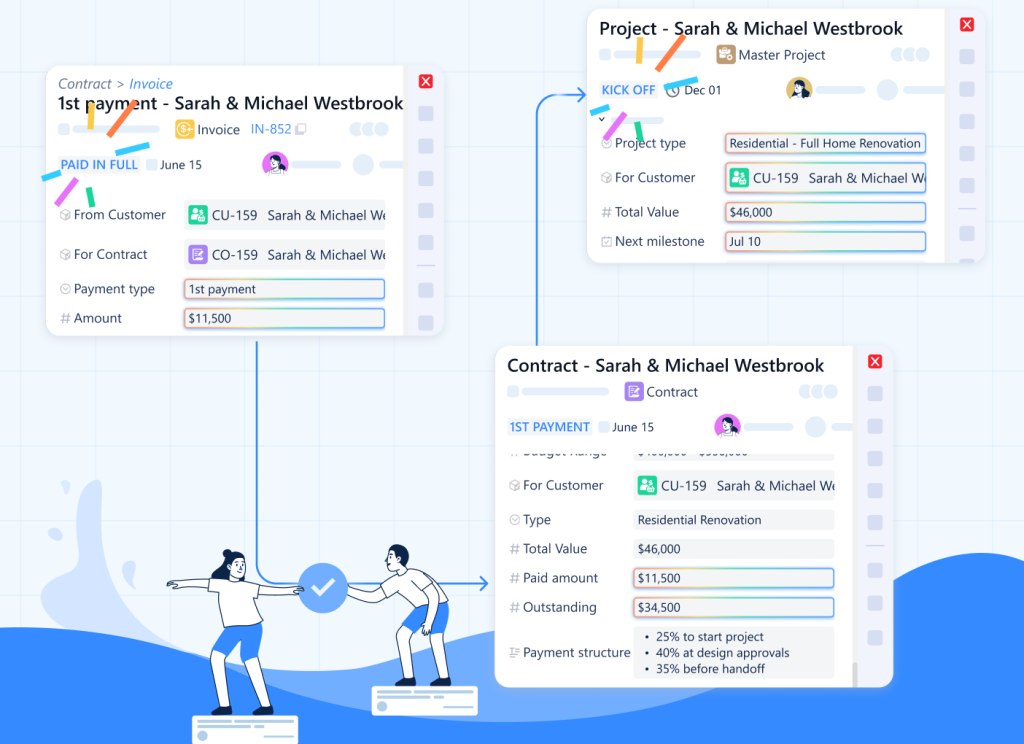
In Luklak, we use a simple concept called Dot Notation. It allows you to pull context from anywhere in the network without moving data around.
- Want to email the manager of the person who owns the server?
Ticket.Server.Owner.Manager.Email - Want to check the total value of the client associated with a project?
Project.Client.Total_Contract_Value
You aren’t creating new fields. You aren’t duplicating data. You are simply looking through the “Data Tube” to see the reality that already exists.
Stop Managing Islands
Your business is not a list of tasks. It is a complex ecosystem of relationships.
When you leave your data in silos, you strip away the context your team needs to make smart decisions. You turn intelligent operators into task-doers.
The Object Connection Lego reconnects the tissue of your organization. It ensures that when one thing happens—a server crashes, a deal closes, a budget is requested—the entire system understands what it means.
Don’t just store your data. Wire it.