


Build the system that mirrors your operation, not ours.
Master nine universal blocks to model any operation—from CRM, HRM to Inventory—on a single unified foundation.


From building blocks to blueprints
Function is the blueprint
This is where you define how work happens. You map out the objects (Leads, Deals), the data fields, the workflows, and the automation rules. Think of this as the architectural drawing of a house.

Space is the building
This is where work happens. Once a Function is designed, you can launch it as a “Space” for your team. Need a CRM for the US team and another for the EU team? You don’t rebuild. You simply launch two Spaces from the same Function.

What you’re replacing:






Know exactly which ad drives revenue, not just clicks
Auto-Tracking Setup: Instantly generates unique utm_id links for every new Ad Creative, ensuring no lead enters the system without a source.
The Sales Handoff: When a lead submits the webform, the system creates a Customer record in Sales, carrying the “Nordic Villa” preference context so the rep knows exactly what to pitch
ROI Feedback Loop: As deals close in Sales, the revenue data flows back to the original Marketing Ad object, automatically updating the campaign’s “Realized ROI” in real-time.

Zero lead leakage. Clean data handoff to Finance.
Smart Assignment: Auto assigns via weighted round- robin. If a new lead sits untouched for 2 hours, the “Auto-Reclaim” rule reassigns it to ensure speed.
AI Meeting Intel: The system integrates with the Call Center to record conversations, using AI to auto-summarize transcripts and log key insights.
Accounting Handoff: Moving the status to “Contract Prep” automatically triggers the creation of a Draft Contract in the Accounting space


Secures cash to unlock project execution.
One-Click Contract: Auto-generates a PDF contract from a Google Doc template, populating client names and terms instantly.
Auto-Split Receivables: Generating the contract automatically creates three linked Invoice records (Deposit, Progress, Final) with specific due dates.
Ops Handoff: The moment the bank confirms the deposit via webhook, the Invoice marks as “PAID”, triggering the Master Project launch


Connects field reality to prevent errors.
Site Limitation Blocker: A field worker’s QR scan report (e.g., “Old Brick Wall”) blocks the project workflow and alerts the design team instantly
Context-Aware Design: The Design Object is updated with these limitations, ensuring architects cannot ignore field constraints
Success Handoff: Marking the Master Project as “Completed” records the launch date and automatically triggers the “After-Sales” workflow

Turns finished projects into recurring revenue.
Auto-Loyalty Reward: Instantly calculates a voucher value (e.g., $500) based on project spend and emails it to the client
Recurring Care: Automatically schedules an “After-Sales Care” object for 6 months later, prompting the team to check in
The Upsell Connection: If a check-in reveals a new need, the system loops back to create a New Opportunity record in Sales

People, not paperwork
Auto-Onboarding: Trigger IT setup, contract sending, and welcome emails the moment a candidate says “Yes.”
Self-Serve Leave: Approved time-off requests automatically block out that designer’s availability on the project calendar.
Secure Vault: Keep sensitive salary data and contracts locked down with strict, granular permission controls.

Fast-track the “Yes”
Smart Routing: Requests under $500 go to a Manager; over $5k route automatically to the CFO.
Audit Trails: Keep a permanent, timestamped record of every decision to replace messy email threads.
Mobile Approval: Managers can approve travel or budget requests with one tap, even while on site.

Connect high-level planning to daily execution.
Break down the complexity: Organize initiatives into clear hierarchies, keeping high-level milestones directly linked to the specific tasks that drive them.
Approve work in context: Stop chasing emails. Review deliverables, discuss feedback, and sign off on active tasks directly where the work happens.
Watch the margin: Track billable hours and expenses against the budget in real-time, ensuring every project stays profitable as it progresses.

Know what you own
Chain of Custody: See the full history of who held the device, from purchase to current assignment.
Proactive maintenance: Schedule equipment servicing based on usage duration and flag assets for repair directly from the mobile app.
QR Scanning: Scan a sticker on site equipment to instantly view its status and update its location

The daily HQ
Separate noise from news. Keep critical company announcements distinct from social club chatter so important updates are never missed.
Turn events into action. Let employees register for town halls or parties with one click, automatically building the attendee list.
Build a culture of gratitude: encourage peer-to-peer recognition with a public “Kudos” feed that links directly to employee profiles.


Build and deploy any functions in 9 simple steps


Step 1: Define the Objects
Start with the core entities: Deal, Client, and Site Visit. You aren’t limited to these three—you can continue adding objects like Invoices, Competitors, or Partners as your ecosystem grows.


Step 2: Set the Data Fields
Add “Contract Value” (Currency) and “Fabric Requirements” (Rich Text). From formulas to data table, you have over 20 field types to capture every unique detail of your niche.


Step 3: Map the workflow
Define a unique lifecycle for each object type. For Deals, map the sales path: New Lead -> Negotiation -> Won. For Site Visits, map the execution path: Scheduled -> On-Site -> Report Filed. Every object moves to its own drumbeat.
Whether it’s a simple 3-step flow or a complex branching workflow, you define the rules of the road.


Step 4: Connect the objects
Link the Deal to the Client. This isn’t just for visibility—it’s the gateway for automation. Once this bridge exists, you can create rules to transport data (like addresses, status tags, or values) across objects instantly. If they are connected, data can flow.


Step 5: Visualize & Analyze
Configure a Kanban Board for active deal management and a Calendar View for field schedules. Simultaneously, build a Manager Dashboard with real-time charts to track “Revenue vs. Targets.” Whether doing the work or measuring it, you design the interface.


Step 6: Set Filters & Reminders
Don’t just build reports; subscribe to them. Create a saved filter for “Deals > $50k in Negotiation” or “Stalled Site Visits.” Subscribe to the list, and you will receive an automatic notification in your unified inbox the moment any record matches your criteria.


Step 7. Automate the Busywork
Link your objects with logic: “When Status = Site Survey, auto-create a Visit Task.” This is just one example—you can chain endless triggers to move data across the entire system automatically.
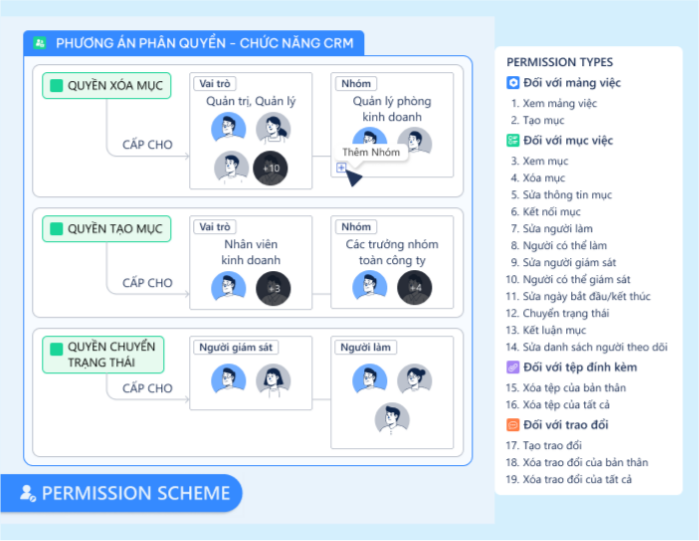

Step 8. Secure & Notify
Define who sees what and who gets alerted. First, set Permission Schemes. Then, wire the notification logic: map triggers (like “Status Change”) directly to abstract Roles, Groups, or User Fields. The system routes the signal to the right function automatically, independent of specific personnel.


Step 9: Deploy the function
Your blueprint instantly transforms into a living environment where real work happens. Your team interacts with live data, guided by the exact workflow and logic you engineered—no friction, just a perfectly optimized system running underneath their daily tasks.


The Total Customer Solution

Marketing to CRM
A Webhook instantly creates a Lead Object from your website form. It captures the campaign source and initial requirements automatically, giving Sales full context before they ever say “hello.”

CRM to Contracts
Click one button to generate a linked Contract Object. Pricing, terms, and details pull directly from the Deal record, ensuring the legal agreement matches the sales promise perfectly.

Contract to Product Delivery
When the Contract is signed, an automation trigger instantly creates a Project Object. The delivery team inherits the scope and deadlines immediately—no handover meeting or email threads required.

Product to Customer Support
Agents view the full lifecycle. Because the Support Ticket is linked to the original Deal and Project, the team solves issues based on the actual history, not just client memory.

FAQs
No. You need operational clarity, not code. If you can sketch your team’s process on a whiteboard, you can build it in Luklak. We provide the visual interface to define data fields, drag-and-drop workflow stages, automations, dashboards and set permissions. You act as the architect; the platform handles the engineering.
Yes. This is the superpower of the Universal Object. Because Sales and Operations live in the same database, you can build a single dashboard that correlates Deals Won (CRM Function) with Project Delays (Project Function) and Team Capacity (HR Function). No BI tools, data warehouses, or overnight syncs required.
You adapt instantly, without waiting for developers. In traditional software, changing a workflow requires a change request and weeks of coding. In Luklak, if you need to add a “Compliance Check” stage to your pipeline, you simply drag-and-drop the new stage in the Function Design layer. The change is deployed to your team instantly. The software evolves as fast as your business does.
Because dedicated tools create silos; Luklak functions create systems. When you buy a standalone CRM, it sits isolated from your Project Management and Finance tools, requiring expensive integrations to connect them. When you design a CRM in Luklak, it is born connected to every other function in your company. A “Won Deal” natively triggers a “Project” because they share the same DNA, not because you paid for a connector.
Connect outward without breaking flow.

Explore the Build Layer in details
