


When we say Luklak uses “unified architecture,” we’re not making a marketing claim. We’re describing a specific technical approach: everything you build shares the same nine foundational components.
Think about LEGO. You can build a spaceship, a castle, or a city—not because LEGO gives you pre-built spaceship modules, but because every brick shares the same connection system. The studs on top, the tubes underneath. That consistency is what makes infinite combinations possible.
Luklak works the same way. Whether you’re building a CRM, project management system, HR portal, or support desk, you’re using the same nine components. They snap together perfectly because they were designed together from the start.
This isn’t how most business software works. And the difference matters more than it sounds.
The Alternative: Pre-Built Modules That Don’t Quite Fit
Traditional platforms give you separate modules: a CRM module, a project module, an HR module. Each module has its own data structure, its own workflow engine, its own permissions system. They’re different products bolted together, not components sharing a foundation.
The result: Integration becomes your full-time job. When your sales team closes a deal in the CRM module, it doesn’t automatically create a project in the project module—because they’re fundamentally separate systems. So you build connectors. You write sync scripts. You hire integration specialists.
According to Gartner, companies spend 30-40% of engineering resources maintaining these connections. That’s three engineers out of ten writing glue code instead of building features.
Unified architecture eliminates this entire category of work. When everything shares the same foundation, there’s nothing to integrate.
The Nine Components (And Why Each One Matters)
1. Universal Object: The Foundation
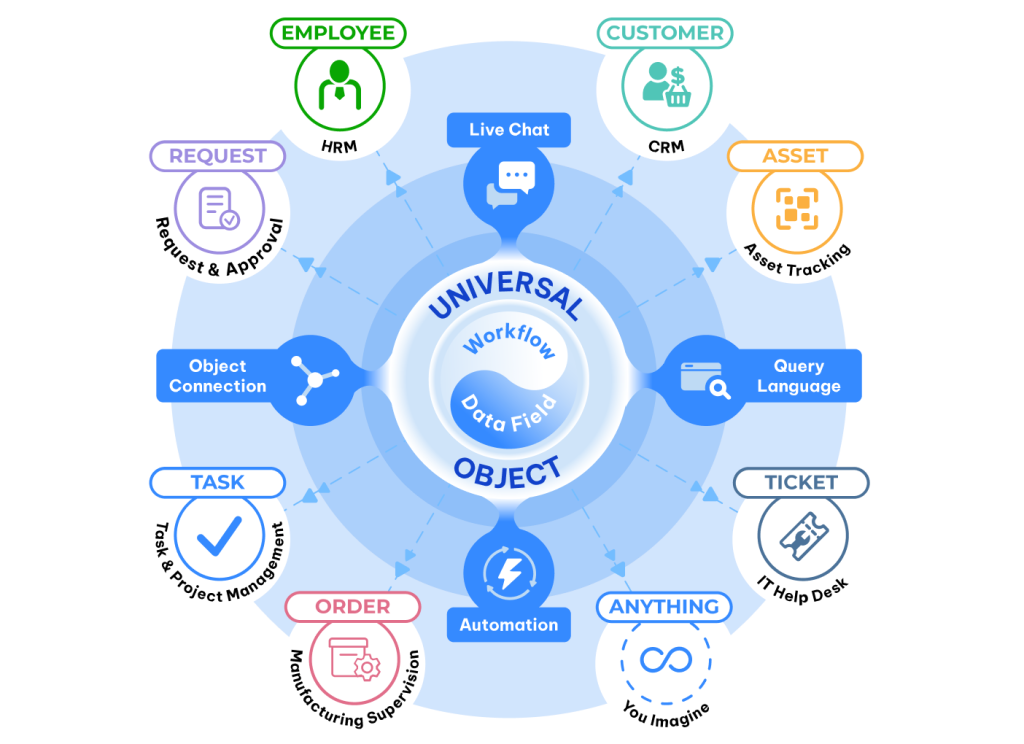
Every business entity you create—customer, project, asset, ticket, employee—is built from the same Universal Object foundation. Not separate databases requiring synchronization. One data model, infinite variations.
Why this matters: When a customer closes a deal, that customer object can instantly relate to the project object, which connects to the task objects, which link to the employee objects. No API calls. No data translation. No sync delays.
2. Universal Workflow: Process Built In
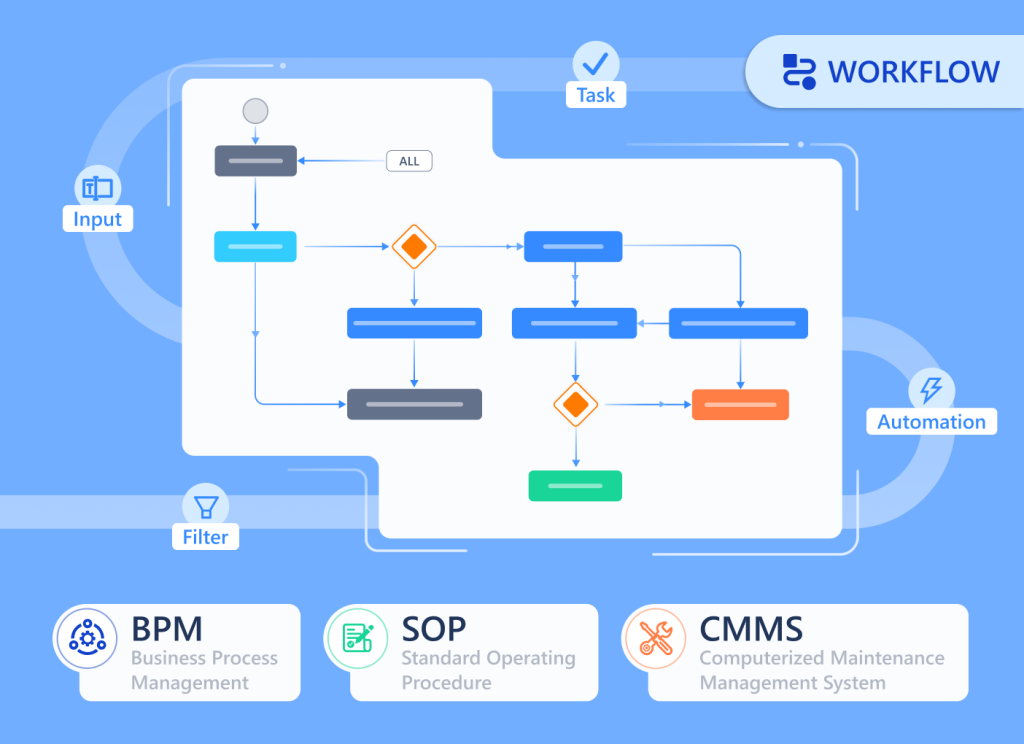
Every object type can have workflow stages. New → In Progress → Review → Complete. Drag-and-drop between stages. Visual pipeline management built into the foundation, not bolted on as a separate tool.
The difference: You’re not buying a workflow tool and integrating it with your data. Workflow is native to every object you create.
3. Data Fields: 20+ Types, Unlimited Flexibility
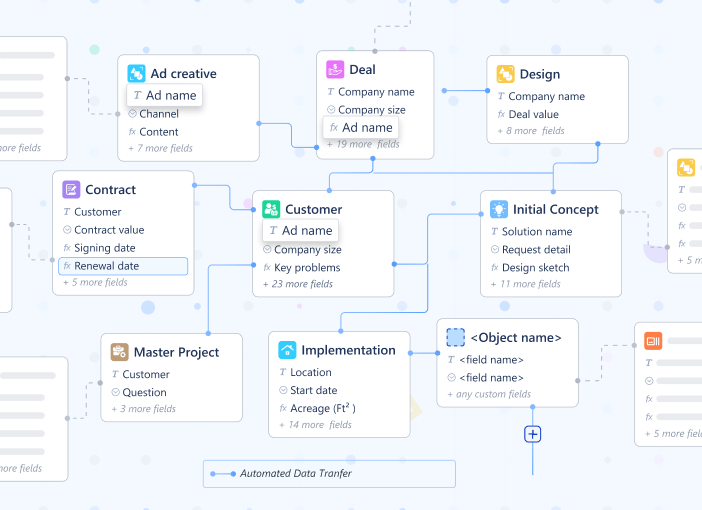
Text, numbers, dates, currency, dropdown selections, file attachments, user assignments, formulas, data tables, object references. Every field type you need, available for any object type you build.
Why standardization matters: When every object uses the same field types, reporting across objects is trivial. A date field in your customer object works exactly like a date field in your project object—so querying “all customers with active projects in Q1” is one line of code, not three system queries with manual reconciliation.
4. Object Connections: Native Relationships
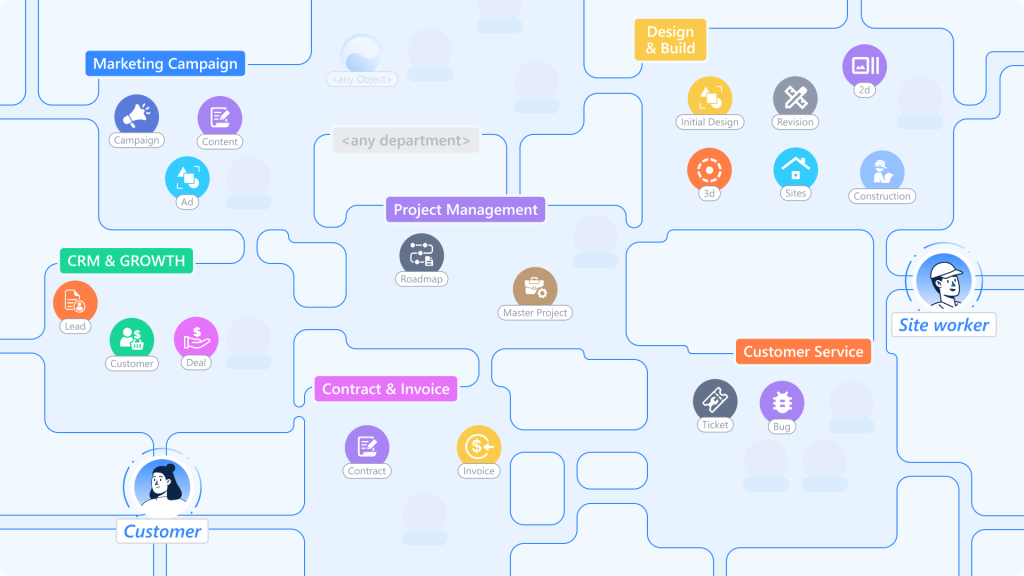
Connect any object to any object. Customer → Project → Task → Employee. One customer can have multiple projects. One project can have multiple tasks. One employee can be assigned to multiple tasks across multiple projects.
The insight most platforms miss: Relationships aren’t just about linking records. They’re about navigating context. When you’re looking at a customer record, you should instantly see all related projects, all open tasks, all assigned employees—without switching between systems.
5. Unified Livechat: Communication Where Work Happens
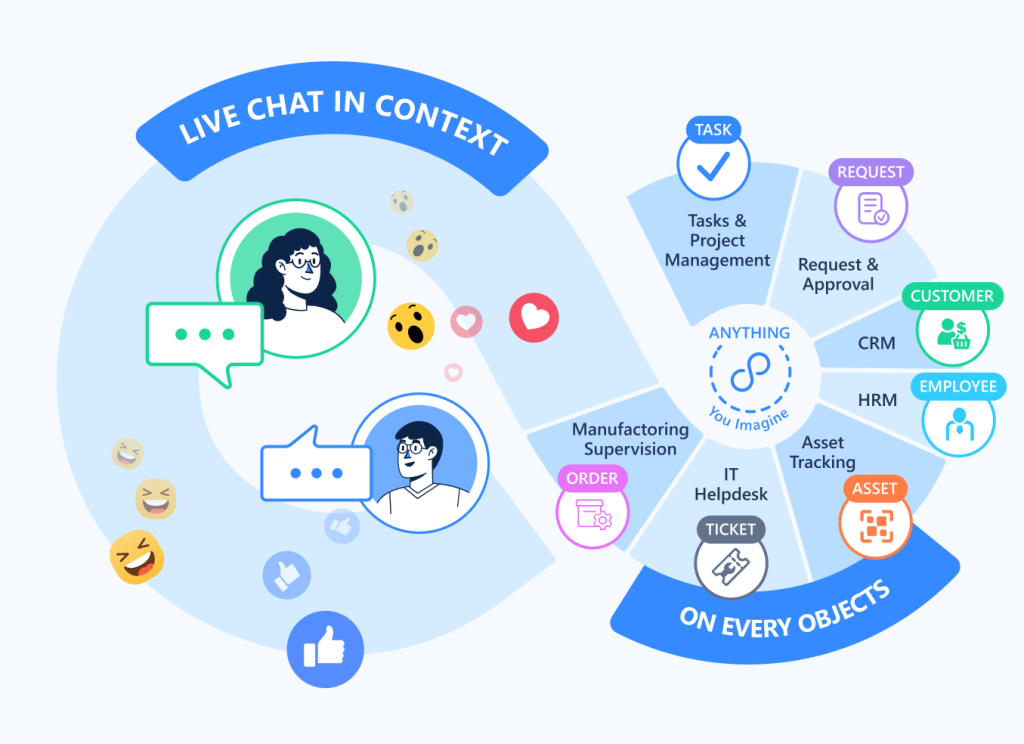
Every object has chat built in. Discuss the customer ON the customer record. Discuss the project ON the project record. Context never gets lost because the conversation lives where the work lives.
Compare this to Slack: When you discuss a customer in Slack, the conversation is separate from the customer data. Someone joins the team next month—they have to ask “which customer are we talking about?” With unified chat, the conversation is part of the customer record. New team members see the full context immediately.
6. Workviews & Dashboards: Multiple Perspectives, One Foundation
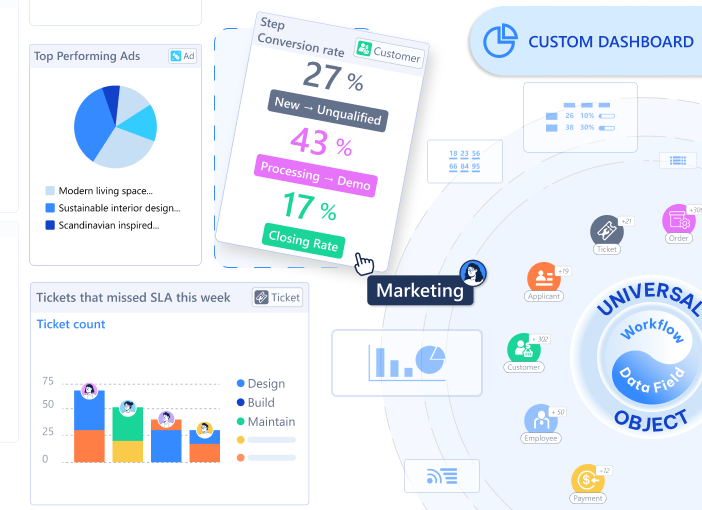
View the same data as a list, Kanban board, calendar, timeline or dashboards. Switch between views instantly because they’re all pulling from the same objects.
The hidden advantage: When your sales team views customers as a Kanban pipeline and your finance team views them as a list sorted by revenue, they’re looking at the same data. Changes appear instantly in both views because there’s only one source of truth.
7. Universal Query Language (UQL): Think, Query, Total Clarity
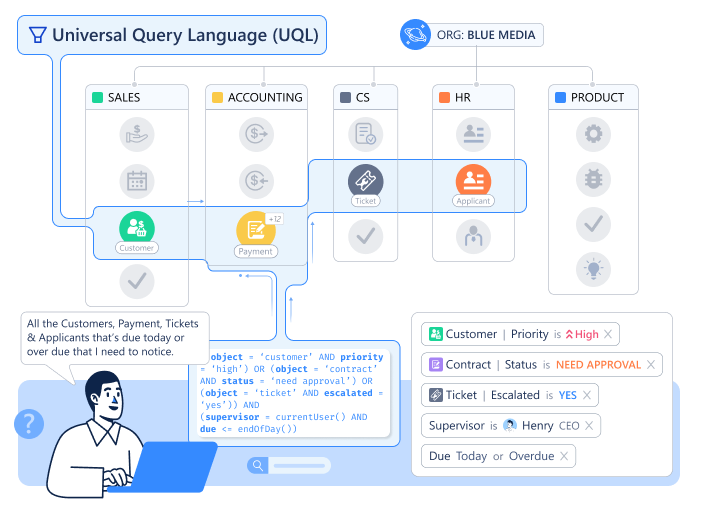
Query across all your data with one language. “Show me all customers with active projects in the construction industry where the project value exceeds $50K and the project manager is located in APAC.”
Why this is hard in traditional systems: That query touches customer data, project data, industry classifications, employee locations. In a typical setup, that’s four different databases requiring four separate queries and manual joining. With UQL, it’s one query across unified objects.
8. Universal Automation: Logic That Spans Functions
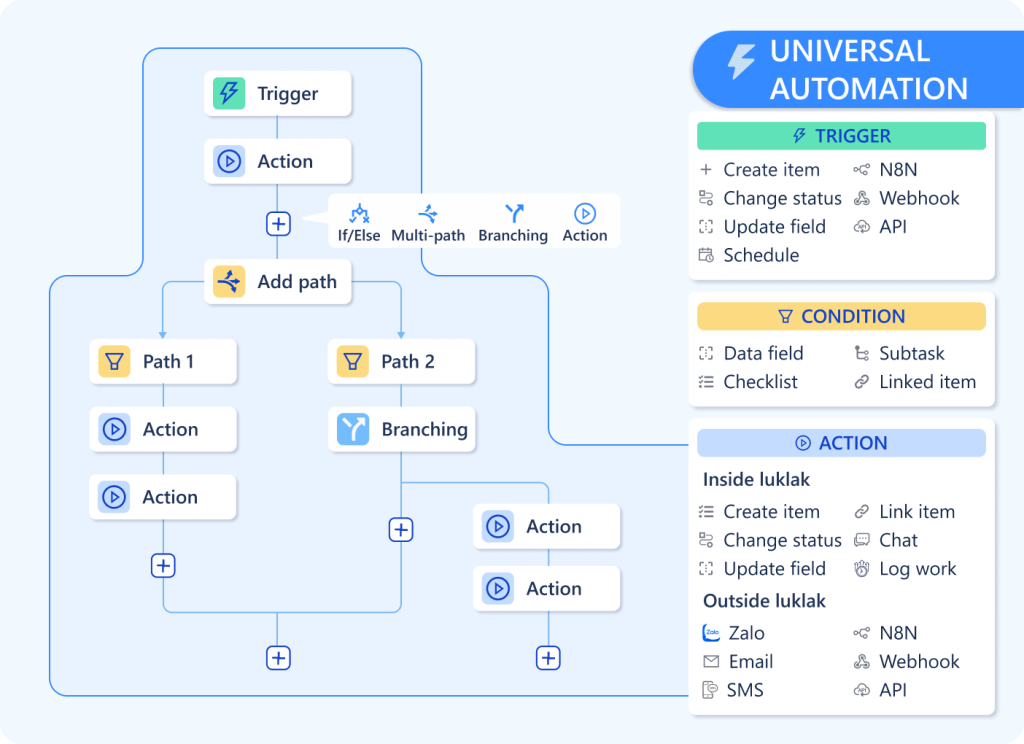
When a deal closes, create a project. When a project starts, assign tasks. When a task completes, notify the customer. Automation works across any objects you create because they all share the same automation foundation.
The power multiplier: You’re not limited to “CRM automation” or “project automation.” You can automate across functions because there are no functional boundaries.
9. Permissions & Notifications: Granular Control, Universal Application
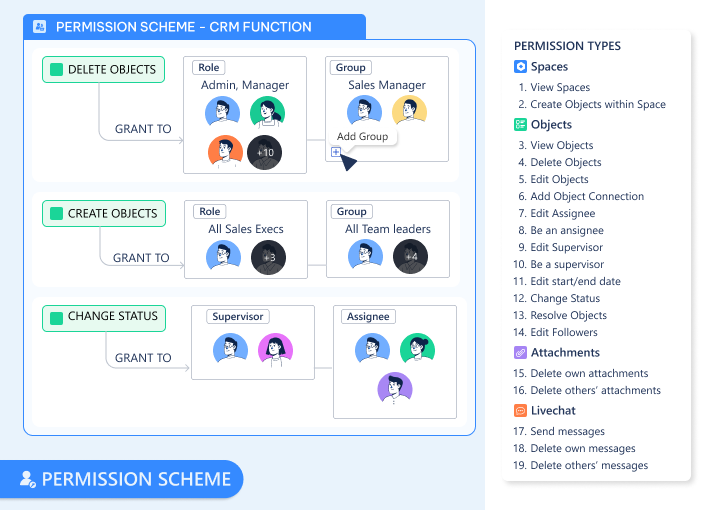
Define who can view, edit, or delete any object. Set permissions at the field level—sales sees customer revenue, support doesn’t. Configure notifications that route to the right people based on role, assignment, or custom logic.
The consistency advantage: You learn the permission system once and apply it to everything you build. There’s no “CRM has role-based security but projects use groups and HR uses custom ACLs.” One permission model, applied universally.
Why “Unified” Isn’t Just Marketing
Here’s the test: How many times do you define “customer”?
Traditional platforms: Once in the CRM, once in the billing system, once in the support platform. Three definitions requiring synchronization.
Unified architecture: Once. Every function you build references the same customer object.
That difference compounds. When you have 50 object types (customers, projects, employees, assets, invoices, tickets, etc.), the traditional approach creates exponential integration complexity. The unified approach creates zero integration work.
Blue Media, a Vietnamese marketing agency, describes the shift simply: “We stopped managing system boundaries and started managing work.”
What This Enables (That You Can’t Do Otherwise)
Cross-functional workflows without integration work
When a customer support ticket escalates, automatically create an engineering task and notify the product team—because support tickets and engineering tasks are both just objects sharing the same foundation.
Reporting that spans the entire business
“Which customer segment has the highest project completion rate and lowest support ticket volume?” That’s one query in UQL, not three reports manually combined in Excel.
Context that never fragments
Every conversation, every document, every data point related to a project lives on the project object. New team members don’t ask “where’s the project information?”—it’s all in one place.
Changes that propagate instantly
Update a customer’s industry classification once. Every dashboard, every report, every automation that references that customer sees the update immediately. No sync delays. No stale data.
The Architecture Question
Most platforms ask: “What modules do you need?”
Luklak asks: “What will you build with these nine components?”
The first question assumes your business fits pre-defined categories. The second question assumes your business is unique and gives you the foundation to build accordingly.
Both approaches work. Traditional platforms with pre-built modules serve millions of companies successfully. But they work by forcing your processes to fit their architecture.
Unified architecture works by letting you build the architecture your processes actually need.
The choice is: Do you adapt your business to the software, or build software that adapts to your business?
For most operations teams, that’s not really a choice at all.
