


TL;DR: Most software forces your business into their boxes. Universal Objects flip this—giving you molecular building blocks that snap together automatically, so you build what you actually need.
Every Tuesday morning, your operations team begins the ritual.
Export customer data from the CRM. Copy project details from the project tool. Pull support tickets from the helpdesk. Paste everything into a spreadsheet. Spend ninety minutes reconciling why the same customer has three different IDs across three different systems.
This isn’t a training problem. It’s an architecture problem.
The Pre-Built Module Trap
Traditional business software arrives with pre-built modules: a “CRM module,” an “HR module,” a “Project module.” Each module comes with:
- Fixed data structures you can’t change
- Pre-defined fields you adapt to (not the other way around)
- Limited relationships between modules
- Separate databases requiring integration
The result? You force your business processes into someone else’s assumptions about how work should flow.
Your sales process has seven stages, but the CRM only supports five. You need to track equipment maintenance, but there’s no “equipment module.” You want to link customers to projects to invoices, but each lives in a separate system with its own data model.
Custom fields cost extra. Integrations break. Your team becomes data translators instead of operators.
One Foundation, Infinite Possibilities
Universal Objects work differently.
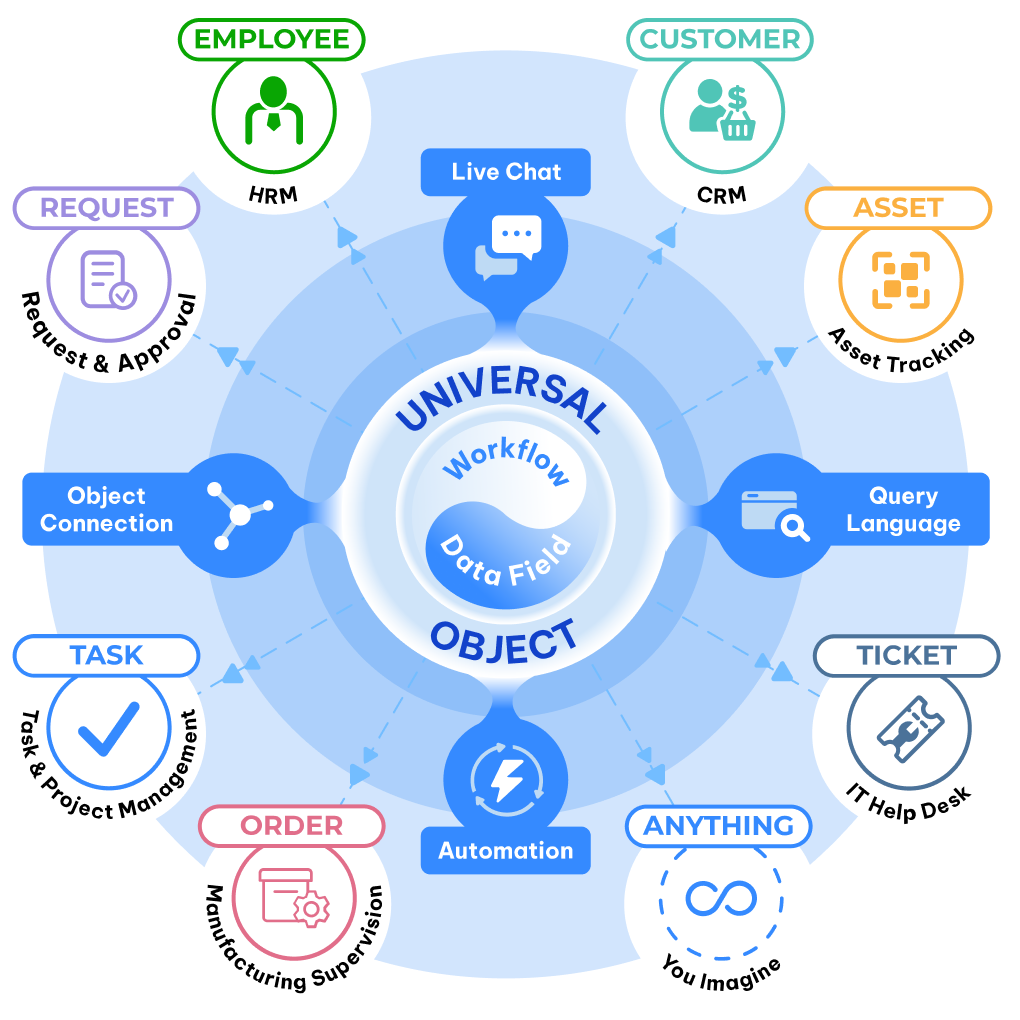
Instead of giving you hardcoded modules, Luklak gives you a flexible foundation for creating any business entity you need. Think of it like building construction—you can build houses, offices, or factories, all sitting on the same type of foundation. Plumbing, electrical, and HVAC work the same way across different buildings.
In Luklak, you create:
- A “Customer” object
- An “Employee” object
- An “Equipment” object
- A “Support Ticket” object
- anything…
Underneath, they all share the same Universal Object architecture. That’s why they:
- Connect natively — No integration APIs needed
- Query together — One query language across everything
- Automate together — Workflows span any objects
- Chat together — Unified communication embedded to each Object
The Architecture That Changes Everything
Here’s what makes Universal Objects different from traditional database records or spreadsheet rows:
- Native workflow built in. Every object type you create automatically includes workflow stages. Customer objects move through “Lead → Qualified → Negotiation → Closed.” Support tickets flow through “New → In Progress → Resolved.” You define the stages. The workflow engine is already there.
- Embedded communication. Every single object instance has live chat built directly into it. Discuss the customer record ON the customer record. Talk about the project ON the project. Context never gets lost in separate Slack threads.
- Universal relationships. Connect any object to any object. Customer → Orders → Projects → Invoices. Parent → Children → Subtasks. The relationship engine is bidirectional, queryable, and visual. No foreign keys to manage. No join tables to configure.
- Automatic inheritance. When you build automation, permissions, or views at the object type level, every instance inherits those capabilities. Define a workflow once. Every new customer record follows it. Set permissions on “Project” objects. Every project respects them.
Why This Matters for Real Operations
Let’s see how this plays out at LAIKA, an interior design firm that switched from scattered tools to Luklak.
Before: Marketing ran campaigns in one tool, Sales tracked leads in a CRM, Project Management used a separate platform, and Accounting lived in yet another system. When a lead became a customer, someone manually created matching records in three different places. When project status changed, someone manually updated the CRM. When invoices were sent, someone manually noted it in the project tool.
After: LAIKA built everything from Universal Objects:
- Marketing Campaign object (tracks campaigns with budget, timeline, performance)
- Lead object (captures inquiries, automatically connects to source campaign)
- Customer object (inherits lead data, connects to contracts)
- Project object (links to customer, creates task hierarchy)
- Invoice object (references project, auto-populates from project data)
Because all five object types share the Universal Object foundation, they connect automatically. When Marketing converts a lead, Sales sees it instantly. When Sales closes a deal, Project Management gets notified with full context. When projects hit milestones, Accounting triggers invoices. No manual handoffs. No duplicate data entry. No reconciliation spreadsheets.
What You Can Build
The same nine Universal Object capabilities appear in everything you create:
- Customer relationship management. Build your CRM exactly how your sales process actually works—not how off-the-shelf tools think it should work.
- Project and task management. Create project hierarchies, task dependencies, and resource allocation that match your delivery methodology.
- HR and people operations. Model employees, positions, departments, performance reviews, and time-off tracking in your organizational structure.
- Asset and inventory tracking. Design equipment registries, maintenance schedules, and location tracking for your specific asset types.
- Support and ticketing systems. Configure ticket types, priority schemes, and escalation rules for your support workflow.
- Custom workflows. Build anything your business needs—vendor management, compliance tracking, equipment rentals, membership programs.
The common thread? They’re all built from the same Universal Object foundation, so they work together automatically.
The Integration Tax You’re Not Paying
Traditional business software charges you integration tax—the hidden cost of connecting systems that weren’t designed to work together.
Zapier fees. Pay per task to move data between disconnected apps.
Engineering time. Spend 30-40% of development resources maintaining integrations.
Sync delays. Wait 4-48 hours for data to propagate across systems.
Broken workflows. Debug integration failures when APIs change.
Data inconsistency. Reconcile mismatches when systems define “customer” differently.
With Universal Objects, there is no integration tax. Everything shares the same data model, same query language, same automation engine. You build once. It works everywhere.
The Foundation That Scales
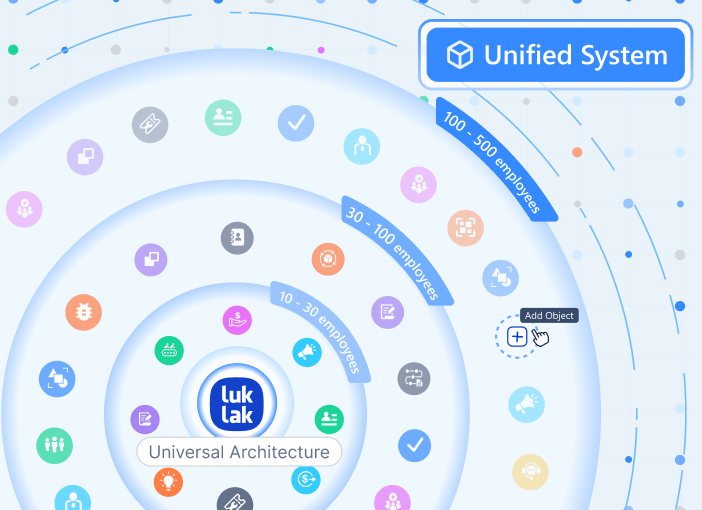
Start with three object types. Grow to thirty. The architecture doesn’t change.
Early-stage startups build their first CRM and project tracker in days. Mid-market companies model complex operations with dozens of interconnected object types. Enterprises run entire business units on hundreds of custom objects and thousands of automation rules.
The ceiling doesn’t exist because you’re not working within someone else’s module limitations. You’re working with architectural building blocks that compose infinitely.
What This Means for Your Team
For operators, it means no more data translation. Build the workflow you need. Connect it to everything else. Query across all your data in one place.
For executives, it means one source of truth. Every department works in the same system with the same data model. Real-time visibility without integration delays.
For IT, it means zero integration debt. No middleware to maintain. No APIs to version. No sync jobs to monitor. Just one unified architecture.
The foundation changes everything else you build. When your CRM, your projects, your support tickets, and your finance data all share the same Universal Object DNA, they work together automatically. Not through integrations. Not through middleware. Through shared architecture.
That’s what makes Luklak unified—not just connected.
Next in the series: Universal Workflow — How every object gets native process automation built in.

